


Cloud POS offline mode allows restaurants to continue taking orders and processing transactions even when their internet connection drops. Imagine it is 7:00 PM on a Friday dinner rush: your dining room is packed, servers are placing orders, and kitchen tickets are flowing smoothly—until the Wi-Fi suddenly disconnects. With offline capabilities, your restaurant can keep running, store transaction data locally, and automatically sync saved records to the cloud once the internet connection is restored.
For many restaurant operators, this is a worst-case scenario. The common fear is that an offline mode cloud POS will instantly freeze, lose pending transaction data, or block checkout at the counter.
Fortunately, modern cloud POS platforms are built with contingency mechanisms. Built-in offline capabilities allow restaurant staff to continue taking orders, printing kitchen tickets, and processing cash transactions without interruption, automatically syncing all saved data back to the cloud once connectivity is restored.
What Is a Cloud POS (and Why Does It Need the Internet)?
A cloud-based POS system stores core business data such as menu configurations, inventory levels, pricing rules, and sales reports on secure cloud servers rather than on a single physical machine inside the store.
This architecture provides key operational benefits:
- Real-time Reporting: Access live sales performance and financial metrics from any device, anywhere.
- Multi-Branch Management: Update menus, pricing, and user permissions across multiple locations from one central dashboard.
- Automatic Data Backups: Eliminate the risk of data loss caused by local hardware crashes or server corruption.
However, because cloud software continuously communicates with remote servers to refresh data, a stable internet connection is vital for live features. When local connectivity fails, the software relies on a dedicated offline POS system for restaurants to prevent service interruptions.
What Is Offline Mode in a POS?
POS offline mode is a contingency feature that allows cloud-based point-of-sale software to run locally on devices during an internet outage. It stores order and payment records in encrypted local terminal memory and automatically uploads them to cloud servers once connectivity returns.
Understanding what functions offline versus what requires an active network connection helps managers handle network drops efficiently:
- What Usually Works Offline: Creating table orders, sending order tickets to kitchen printers over local LAN networks, generating paper cash receipts, and holding active table tabs.
- What Usually Requires Internet: Online digital payment gateways (e.g., GCash, Maya QR, or real-time credit card authorization), live third-party delivery app integrations, and multi-outlet master reports.
Because system architecture varies by vendor, review the CukCuk POS page to confirm exact capabilities supported during network downtime.
How Offline Mode Works, Step by Step
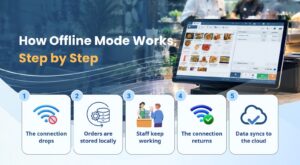
When internet service drops, a cloud POS switches seamlessly to local processing mode. Here is how POS offline mode explained works across five core stages:
- Step 1: The connection drops. The POS app detects the loss of external internet packets and immediately transitions into local offline mode without interrupting active user screens.
- Step 2: Orders are stored locally. Transaction records, item modifications, and timestamped actions save directly to encrypted local terminal memory.
- Step 3: Staff keep working. Floor staff continue keying in items, and kitchen display units or local printers output tickets across the internal local area network (LAN).
- Step 4: The connection returns. The POS application constantly ping-tests cloud servers in the background and identifies when Wi-Fi or cellular service stabilizes.
- Step 5: Data syncs to the cloud. Stored offline transactions upload automatically to cloud databases, updating central inventory levels and financial reports.
Data Sync Explained
Understanding POS data sync is essential for maintaining accurate accounting and inventory tracking across shifts.
What Gets Synced?
When the connection is restored, the local terminal uploads a batch log containing:
- Itemized sales records and payment tenders.
- Inventory deductions linked to completed orders.
- Updated customer profiles and loyalty points earned.
- Staff audit logs and timestamped cash drawer actions.
Sync Timing & Trigger Mechanism
Modern systems execute data synchronization automatically in the background without requiring manual intervention. Managers can also initiate a manual sync from the system settings menu if necessary.
Conflict Resolution & Error Handling
If two separate terminals edit shared records while offline such as updating stock counts or modifying the same table order the cloud database applies pre-configured conflict logic. In most cases, the system prioritizes the most recent timestamp or flags conflicting inventory entries for manager review.
Local Data Security
To prevent unauthorized access during outages, transaction logs stored on local devices are protected with AES encryption until they successfully transfer to cloud servers.
Offline Mode Limitations You Should Know About
While offline capability protects core daily operations, certain cloud-dependent services are temporarily paused during network outages:
| POS Functionality | Works Offline? | Needs Active Internet? | Dependencies / Notes |
| Cash Order Processing | Yes | No | Stores transaction locally on terminal. |
| Kitchen Ticket Printing | Yes | No | Requires an operational local LAN network. |
| E-Wallets (GCash / Maya) | No | Yes | Real-time payment API authorization needed. |
| Online Card Terminals | No | Yes | Payment processors require web authentication. |
| Delivery App Integration | No | Yes | Webhooks require active internet connection. |
| Multi-Branch Live Reports | No | Yes | Central cloud database updates upon reconnection. |
Tip: Before committing to a subscription, always request a detailed capability matrix from your vendor to verify which features function offline.
Why Offline Mode Matters for Restaurants in the Philippines
Operating an F&B business in the Philippines presents unique infrastructure challenges:
- Weather-Related Disruptions: Typhoon seasons, tropical storms, and power brownouts frequently disturb broadband and cellular services.
- Location Dead-Zones: Restaurants located in provincial regions, crowded shopping malls, or basement food courts often experience fluctuating signal strength.
- Revenue Preservation: A POS freeze during peak hours causes extended wait times, lost orders, and frustrated customers.
Having a reliable restaurant POS no internet Philippines setup guarantees that operational workflow remains uninterrupted regardless of external network issues.
How to Prepare Your Restaurant for Internet Downtime
To safeguard your restaurant against connectivity issues, implement these practical operational measures:
- Deploy Dedicated POS Wi-Fi: Use a business router and isolate POS hardware on a private network, keeping guest traffic separate.
- Set Up Secondary Redundancy: Configure a backup cellular failover (such as a 4G/5G SIM router or mobile hotspot) that activates automatically when primary ISP connection fails.
- Maintain Battery Backups: Keep POS terminal batteries charged and keep emergency power banks on hand for handheld order devices.
- Train Staff on Offline Procedures: Ensure staff understand how offline processing works, including how cash transactions and manual receipts are logged.
- Verify Shift End Synchronization: Instruct shift managers to confirm that all cached offline orders have fully synced before closing register drawers.
- Keep Manual Payment Options Ready: Maintain backup card swipe procedures or manual payment fallback options for non-cash transactions during extended outages.
Questions to Ask Before Choosing a POS with Offline Mode
When evaluating vendor options, ask these essential technical questions:
- Which specific floor and kitchen functions remain active offline, and which are blocked?
- How long can the POS operate offline before requiring a master server sync?
- How is local order data encrypted on the hardware during an outage?
- How does the software report and resolve data sync conflicts?
- Is offline processing included natively in standard plans, or does it require a premium addon?
Frequently Asked Questions
Can a cloud POS work without internet?
Yes. A cloud POS with offline capabilities allows staff to create orders, print kitchen tickets, and accept cash payments without an active internet connection. Data saves locally and syncs back to the cloud when connectivity returns.
Will I lose sales data if the internet goes down?
No. Transactions completed offline are stored in encrypted local device memory. Once the network reconnects, the software automatically uploads all cached data to central cloud servers.
How long does data sync take after reconnecting?
For standard sales volume, data synchronization completes within a few seconds to a couple of minutes after network restoration. Sync speed depends on network bandwidth and the number of stored offline transactions.
Can I accept card or GCash payments offline?
Digital e-wallets (GCash, Maya) and integrated online card terminals require real-time server authorization and cannot process without internet access. Offline transactions are typically restricted to cash payments or manual offline card entries.
Is offline mode safe for my transaction data?
Yes. Reputable cloud POS systems use local data encryption to secure transaction records stored on the device until they are uploaded to the cloud.
Do I need special hardware for offline mode?
Most modern touchscreen terminals and tablets with adequate local storage support offline processing. Ensure your local kitchen printers are connected via a local network router so print jobs continue without internet access.
Conclusion
An internet drop should never bring restaurant operations to a halt. By deploying a cloud POS equipped with robust offline mode and automatic data synchronization, restaurant owners can protect revenue, maintain fast service, and preserve data integrity during network outages.
Discover how CukCuk keeps your operations running seamlessly through network drops and peak hours. Book a CukCuk demo today.