

If you’re planning to invest in a point-of-sale (POS) system, one of the first questions you’ll probably ask is, “How much does a POS system cost in the Philippines?” The answer isn’t always straightforward.
Many business owners assume that every POS system has a standard price. In reality, POS system pricing in the Philippines varies depending on several factors, including your business type, required features, hardware, number of branches, and deployment model.
Whether you’re opening a café, managing a retail store, or expanding into multiple branches, understanding what affects POS pricing helps you avoid overspending while choosing a solution that supports your long-term growth.
In this guide, we’ll explain the biggest pricing factors, typical cost ranges, hidden expenses to watch for, and how to choose the best value for your business.
What Is a POS System and Why Pricing Varies
A Point-of-Sale (POS) system is a combination of software and hardware that helps businesses process sales, manage inventory, track customer information, generate reports, and streamline daily operations.
The reason POS system cost in the Philippines varies is because every business has different operational requirements.
For example:
- A small coffee shop may only need one terminal and basic sales reporting.
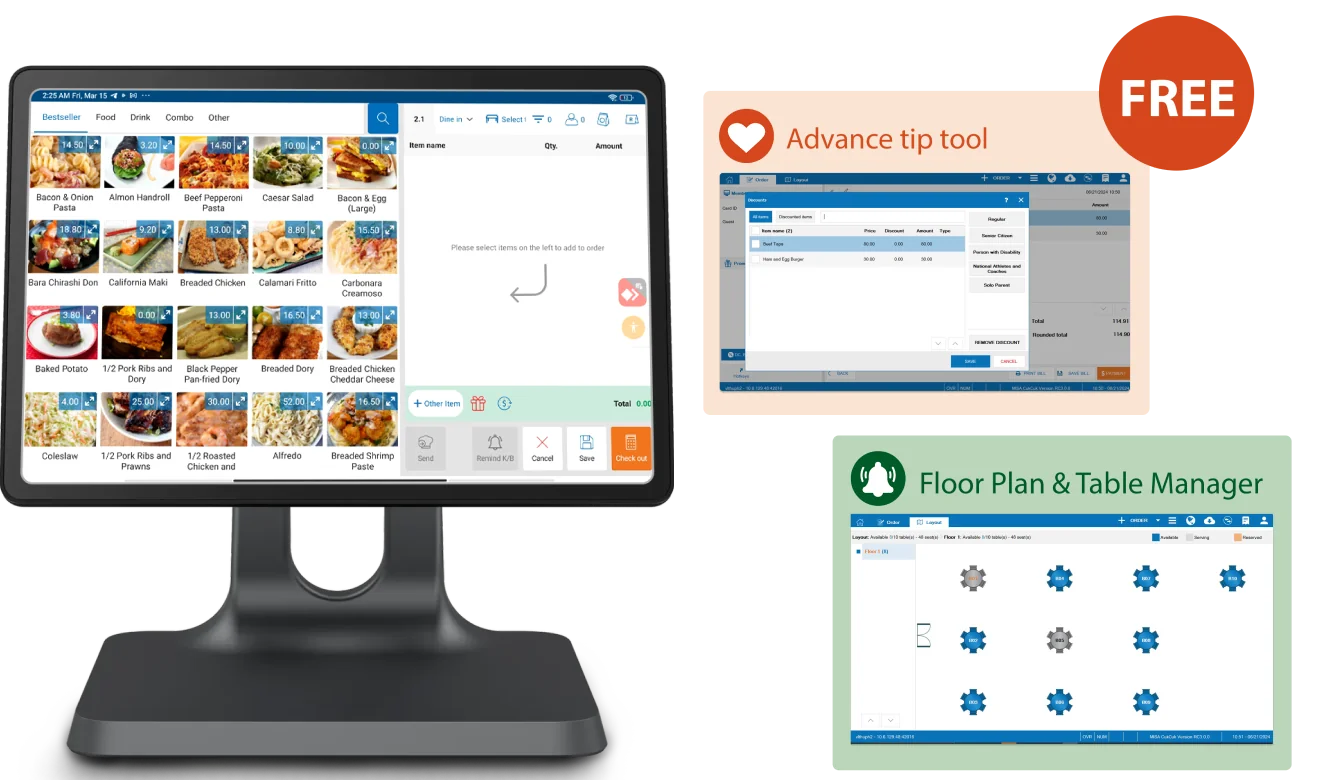
- A restaurant may require table management, kitchen display systems (KDS), and QR ordering.
- A retail chain may need centralized inventory and multi-branch reporting.
The more features, users, and integrations your business needs, the higher the investment.
Key Factors That Affect POS System Pricing
1. Hardware Requirements
Hardware is often the largest upfront investment.
Common POS hardware includes:
- POS Terminal or Tablet
- Receipt Printer
- Cash Drawer
- Barcode Scanner
- Customer Display
- Kitchen Printer (restaurants)
- Kitchen Display System (KDS)
Some providers sell software separately while others offer bundled packages that reduce overall costs.
Businesses should also consider future hardware expansion when budgeting.
2. Software Subscription Plan
Software pricing depends on the provider’s licensing model.
Common pricing options include:
- Monthly subscription
- Annual subscription
- One-time lifetime license
- Free basic plans with limited features
Cloud-based POS providers typically use subscription pricing because they include:
- Automatic updates
- Cloud backups
- Security patches
- Technical support
Premium plans often unlock advanced analytics, inventory management, CRM features, and integrations.
3. Number of Outlets or Branches
A single-store business generally pays less than a company operating multiple branches.
Multi-branch businesses often require:
- Centralized dashboards
- Consolidated sales reports
- Shared inventory
- Branch-level permissions
- Remote management
These enterprise capabilities usually come with higher subscription plans.
5. Industry-Specific Features
Different industries require specialized tools.
Restaurants
Restaurant POS systems may include:
- Table management
- QR ordering
- Kitchen Display System (KDS)
- Split billing
- Reservation management
Retail
Retail businesses typically need:
- Barcode inventory
- Stock transfers
- Purchase orders
- Supplier management
- Loyalty programs
Service Businesses
Service providers often require:
- Appointment scheduling
- Customer profiles
- Staff commissions
- Service history
Choosing features tailored to your industry ensures you only pay for what you truly need.
6. Integrations
Integrations can significantly affect pricing.
Popular integrations include:
- Accounting software
- E-commerce platforms
- GrabFood
- Foodpanda
- Payment gateways
- CRM systems
Some integrations are included, while others require additional subscription fees or setup charges.
7. Cloud-Based vs. On-Premise Systems
Choosing between cloud and on-premise deployment affects both upfront and long-term costs.
Cloud POS
Advantages:
- Lower initial investment
- Automatic updates
- Access anywhere
- Cloud backup
- Easier scalability
Cloud POS usually operates on recurring subscription fees.
On-Premise POS
Advantages:
- Higher upfront payment
- One-time software license (depending on vendor)
- Local server storage
- Greater control over infrastructure
However, businesses may need to budget separately for maintenance, backups, and software upgrades.
8. Customer Support and Training
Support services can also influence pricing.
These may include:
- Installation
- Staff onboarding
- Remote support
- Onsite training
- Priority technical support
While some providers include support in their plans, others charge separately for premium assistance.
9. Customization Needs
Businesses with unique workflows may require custom development.
Examples include:
- Custom reports
- Specialized dashboards
- API integrations
- Custom workflows
- Branded receipts
- Industry-specific modules
Customization increases development time and overall project cost but can improve operational efficiency.
Typical POS Pricing Ranges in the Philippines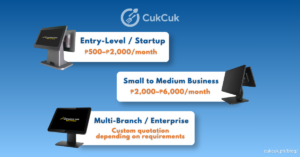
Although pricing differs among providers, here are general estimates:
Hardware packages are usually priced separately and vary depending on the number of devices and peripherals required.
Always request a customized quotation based on your business requirements rather than relying solely on advertised prices.
Hidden Costs to Watch Out For
Before purchasing a POS system, ask your provider about potential additional fees such as:
- Installation charges
- Setup fees
- Training costs
- Payment processing fees
- Premium support plans
- Data migration
- Additional modules
- Future hardware upgrades
Transparent pricing helps prevent unexpected expenses later.
How to Choose a POS System Within Your Budget
A lower price doesn’t always mean better value.
Here are some tips for making a smart investment:
Understand Your Business Needs
Avoid paying for features you’ll never use.
Request a Free Demo
A live demonstration helps you evaluate whether the software fits your workflow before making a commitment.
Think Long-Term
Choose a system that can grow with your business instead of replacing it after a few years.
Compare Total Cost of Ownership
Consider not only the initial purchase price but also:
- Software subscriptions
- Hardware
- Support
- Maintenance
- Future expansion
Look for Transparent Pricing
Choose a vendor that clearly explains what’s included in each plan and discloses any additional charges.
Why CukCuk Offers Value-for-Money POS Solutions
For businesses looking for reliable POS system pricing in the Philippines, CukCuk POS provides flexible solutions designed for restaurants, cafés, retail stores, and growing multi-branch businesses.
Key benefits include:
- Flexible subscription plans
- Cloud-based accessibility
- Real-time sales reporting
- Inventory management
- Multi-branch management
- Kitchen Display System (KDS)
- QR Dine-In Ordering
- GrabFood integration
- Local customer support in the Philippines
- BIR-accredited POS solution
Whether you’re launching your first store or expanding nationwide, CukCuk offers scalable solutions that grow alongside your business.
Request a free product demo or personalized quotation today to find the best plan for your business.