

Small Medium Enterprise (SME) owners need to monitor sales, control inventory, manage employees, understand customer behavior, track branch performance, and make decisions based on accurate business data. When these processes aren’t organized properly, matters like manual reports, or disconnected systems, managing day-to-day operations can quickly become difficult.
The answer to this? A reliable Cloud POS System.
Two solutions Philippine SMEs may consider are CukCuk and UTAK. Both offer cloud-based POS capabilities, inventory management, reporting, and tools designed to help businesses operate more efficiently.
But which is better?
Your business model, operational needs, desired integrations, budget, and the features you truly require will all influence the response. Additionally, the comparison must go beyond simple checkout features for eateries and other F&B establishments.
In this CukCuk vs UTAK comparison, we’ll look at:
- Cloud capabilities
- POS and sales management
- Inventory
- Reporting and analytics
- Restaurant operations
- Employee management
- Customer management
- Digital ordering
- Kitchen operations
- Multi-branch management
- Pricing and total value
- Ease of implementation
- Customer support
- Scalability
The goal is not to declare one POS universally superior, but to help Philippine SMEs identify which solution is a better fit for their specific operation.
How We Compared CukCuk and UTAK
This comparison evaluates publicly available product information from CukCuk and UTAK, with particular attention to the requirements of Philippine SMEs.
Businesses should check the most recent feature availability, integrations, hardware compatibility, and commercial terms directly with the provider before making a purchase because POS platforms are always adding features, changing packages, and updating prices.
Instead of assuming a feature is included, this article identifies it as something to verify when UTAK does not publicly confirm it.
What Is a Cloud-Based POS System?
A cloud-based point-of-sale system is software that stores and synchronizes business information through cloud infrastructure rather than keeping all business data on a single local computer.
Instead of using a POS only as a checkout terminal, a cloud POS can become a central source of information for sales, inventory, customers, employees, and management reports.
How Cloud POS Works
A typical cloud POS setup works by:
- Processing transactions through authorized POS devices.
- Synchronizing business information with cloud infrastructure.
- Centralizing sales and operational data.
- Allowing authorized users to access reports and business information remotely.
- Automatically synchronizing information across connected devices or locations.
Some systems also offer offline functionality, allowing transactions to continue during an internet interruption and synchronize data when connectivity returns.
Why SMEs Are Switching to Cloud POS
For a growing SME, cloud technology can reduce the need for complicated on-site infrastructure while making business information easier to access.
Common benefits include:
- Remote access: Owners and managers can monitor business performance without being physically beside the POS terminal.
- Centralized reporting: Sales and operational data can be consolidated into one dashboard.
- Multi-branch visibility: Businesses with several locations can manage branches from a centralized system.
- Lower infrastructure requirements: Cloud software can reduce dependence on dedicated local servers.
- Scalability: Businesses can add users, devices, products, or locations as operations expand.
- Better visibility: Managers can make decisions using current sales and inventory information.
For a deeper explanation, see CukCuk’s cloud-based POS resources.
What Is CukCuk POS?
CukCuk POS is a cloud-based POS and restaurant management platform designed around food-and-beverage operations.
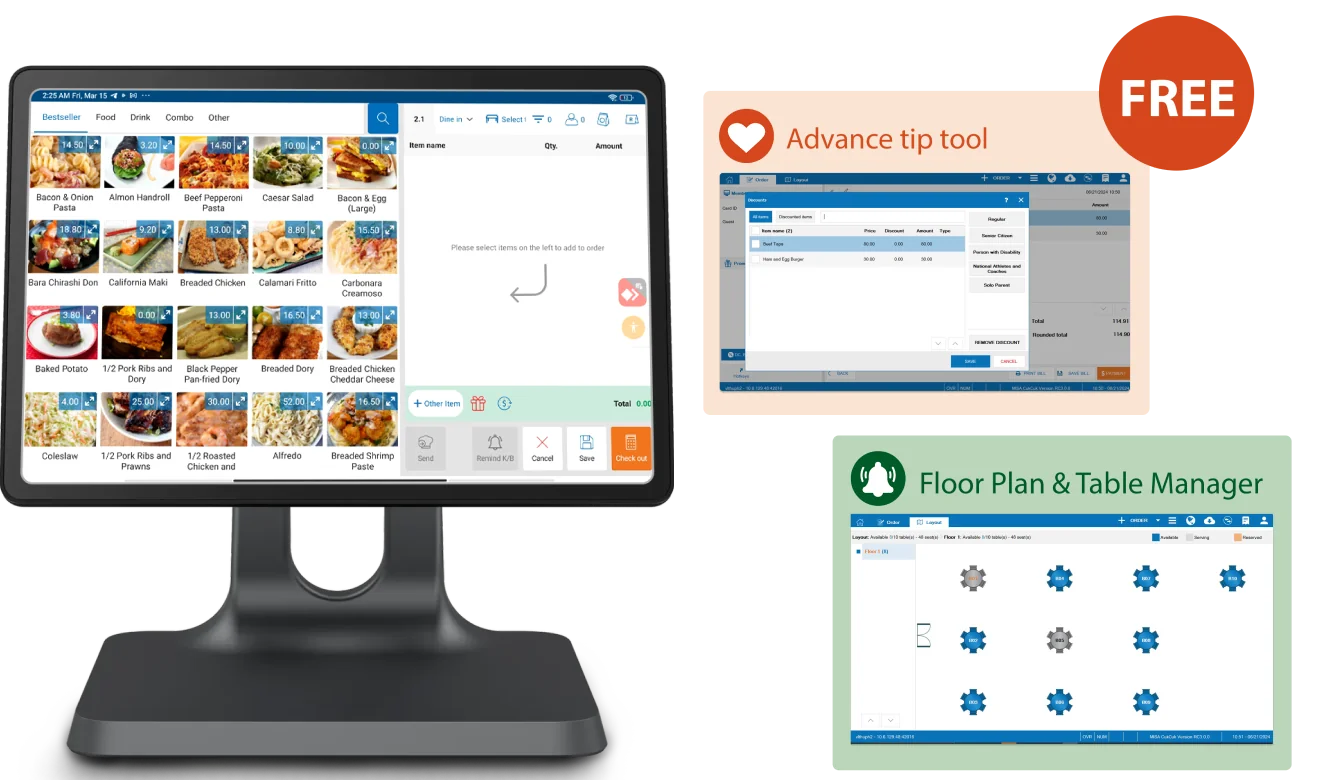
Its current Philippine offering covers both front-of-house and back-of-house requirements. Depending on the plan, CukCuk provides capabilities including sales management, table service, mobile ordering, inventory, employee management, reporting, restaurant chain management, QR Dine-In, website ordering, online reservations, purchasing, accounting functions, and Kitchen Display System functionality.
CukCuk also promotes cloud access, offline operation, tablet compatibility, payment capabilities, restaurant hardware, and integrations with technology partners.
For restaurants, this means the POS can extend beyond the cashier counter into areas such as ordering, kitchen coordination, reservations, inventory, and management reporting.
Who Is CukCuk Best For?
CukCuk is particularly relevant for businesses such as:
- Restaurants
- Cafés
- Coffee shops
- Bakeries
- Bars
- Quick-service restaurants
- Food stalls
- Full-service restaurants
- Growing F&B SMEs
- Multi-branch restaurant businesses
Its product positioning is especially focused on restaurants and food businesses, including businesses that need centralized management as they expand.
What Is UTAK POS?
UTAK POS is an all-in-one cloud-based POS platform developed for Filipino businesses.
Its current public product information highlights real-time sales and performance data, inventory management, multiple-store management, product-mix analysis, audit trails, customer tracking, expense tracking, staff attendance, low-stock notifications, customer displays, Kitchen Display Screens, and an online website.
UTAK also offers POS hardware ranging from tablets and receipt printers to mobile POS devices, barcode scanners, cash drawers, and dual-screen systems. Its hardware range is positioned for restaurants, cafés, convenience stores, retailers, and other businesses.
UTAK publicly advertises software pricing from ₱1,500 per month, while its hardware is offered separately or in packages.
Because product capabilities and packages can change, SMEs should confirm whether specific restaurant functions, integrations, or hardware configurations are included in their selected UTAK package.
CukCuk vs UTAK: Feature Comparison
The most useful way to approach a CukCuk vs UTAK POS comparison is to look at what each platform currently documents rather than relying on broad marketing claims.
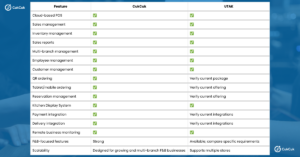
CukCuk’s published feature set specifically includes restaurant-focused functions such as QR Dine-In, tablet ordering, reservations, KDS, table management, inventory, and restaurant chain management.
UTAK’s current public documentation confirms cloud POS, multiple-store management, inventory, reports, customer tracking, staff attendance, KDS, and online selling.
Important: UTAK’s feature set and packages should be verified directly with UTAK before publication or purchase, particularly for QR ordering, reservation management, delivery integrations, and specific restaurant workflows.
CukCuk vs UTAK for Restaurants
Choosing the best restaurant POS Philippines businesses can use requires more than asking whether the software can process payments.
Restaurants have additional operational requirements because orders move between customers, servers, cashiers, kitchen staff, and sometimes delivery channels.
Order Management
A restaurant POS should make it easy to capture orders accurately and communicate them to the appropriate parts of the operation.
CukCuk supports restaurant-oriented workflows including table selection, table changes, combining and splitting tables or orders, takeout and delivery, and kitchen order printing. Its mobile ordering capabilities can also support ordering away from a fixed cashier station.
UTAK supports core POS operations and also offers a Park Order function, allowing ongoing transactions to be saved and resumed.
For a restaurant, however, it is worth testing the exact workflows your staff use every day: dine-in, takeout, order modifications, split bills, multiple payment methods, and peak-hour order handling.
Kitchen Management
Kitchen coordination is one of the areas where a restaurant-specific POS can provide significant operational value.
CukCuk’s Kitchen Display System provides real-time order updates and helps coordinate serving and kitchen teams.
UTAK also currently offers a Kitchen Display Screen that displays orders in the kitchen with item details and preparation notes.
For either platform, restaurants should test how orders are routed, how preparation status is updated, how modifiers appear, and whether the kitchen workflow matches the restaurant’s actual process.
Table and Reservation Management
Table management matters particularly for full-service restaurants.
CukCuk provides table service management and reservation functionality. Its reservation system is designed to provide a centralized view of bookings and reservation status.
For UTAK, businesses should confirm the availability and scope of table and reservation functionality in the current package before making a decision.
QR and Tablet Ordering
Digital ordering can reduce manual order-taking and give customers another way to interact with a restaurant.
CukCuk currently offers QR Dine-In and tablet/mobile ordering. QR Dine-In is designed to let diners access menus and place orders from their tables, while tablet ordering can connect ordering with restaurant operations.
CukCuk also offers online ordering capabilities, including website ordering and order integration.
UTAK currently promotes a free online website where customers can browse products and place orders.
If QR ordering is a major part of your restaurant strategy, ask for a live demonstration of the complete workflow—from customer order to POS, kitchen, payment, and reporting.
CukCuk vs UTAK for Small and Medium Businesses
SME owners typically have different priorities from large enterprises. The POS needs to be powerful enough to support growth without becoming unnecessarily complicated or expensive.
Ease of Use
When comparing POS systems, ask:
- Can new employees learn the system quickly?
- Is the cashier interface intuitive?
- How easy is it to create and modify products or menus?
- Can managers generate reports without technical assistance?
- Can owners monitor operations remotely?
- How easy is it to troubleshoot common issues?
CukCuk emphasizes ease of use and cloud access, while UTAK similarly positions its POS as a simple, all-in-one system for Filipino businesses.
The best way to evaluate usability is through a demo using your actual menu, products, employees, and workflows.
Scalability
A POS should not become a limitation as the business grows.
Consider a progression such as:
1 branch → 2–5 branches → larger multi-location operation
At each stage, the system should make it possible to manage:
- Additional terminals
- Additional branches
- Users and employee permissions
- Inventory
- Product and menu information
- Customer data
- Centralized reporting
CukCuk’s Enterprise plan currently includes multi-store management and has no stated device limit, while its platform is positioned for multi-branch restaurant operations.
UTAK also currently supports multiple-store setup with centralized control and unified reporting.
Business Visibility
A cloud POS becomes particularly useful when owners can see what’s happening without waiting for end-of-day manual reports.
Both platforms provide business reporting capabilities.
UTAK highlights real-time sales, transaction, and performance insights, along with inventory and product-mix analysis.
CukCuk provides real-time dashboards and reports covering areas such as sales, purchasing, inventory, cash flow, expenses, payables and receivables, and profits, depending on the selected plan.
For SMEs, this can make it easier to identify best-selling products, monitor inventory, compare branches, and understand revenue trends.
CukCuk vs UTAK: Pricing and Overall Value
Price is important, but the cheapest POS is not automatically the best value.
The real question is how much the system costs compared with the operational value it provides.
What Should SMEs Consider When Comparing POS Pricing?
Look beyond the advertised subscription price and consider:
- Software subscription or license fees
- POS hardware
- Installation
- Employee training
- Technical support
- Payment integrations
- Delivery integrations
- Additional branches
- Additional devices or users
- Add-on features
- Maintenance
- Hardware replacement
- Implementation costs
CukCuk currently publishes Philippine plans starting with a free Basic option, followed by Standard at ₱1,395/month, Professional at ₱2,750/month, and Enterprise at ₱3,995/month. The paid prices are listed as VAT exclusive, and device limits vary by plan.
UTAK currently advertises software from ₱1,500/month and offers software-only as well as hardware packages.
Because pricing and package inclusions can change, businesses should use the providers’ current pricing pages and quotations when calculating total cost.
Which POS Offers Better Value?
The better-value POS is the one that solves the operational problems your business actually has.
A lower monthly fee may not represent better value if the business still needs separate systems for inventory, ordering, kitchen communication, reservations, or reporting.
Conversely, paying for features that your business will never use can unnecessarily increase costs.
For a growing restaurant, evaluate total cost of ownership plus operational efficiency, rather than subscription price alone.
CukCuk vs UTAK: Ease of Implementation
Implementation is another important consideration for SMEs.
Typical POS rollouts could include:
- Setting up an account
- Configuring a product or menu
- Installation of hardware
- Configuration of payments
- Setting up employees
- Employee education
- Examining
- Launch
- After-launch assistance
CukCuk currently describes a setup process that includes choosing a package, configuration and onboarding support, followed by going live.
How Quickly Can an SME Start Using a Cloud POS?
There is no universal implementation timeline.
A small café with a simple menu and one terminal can generally be configured more quickly than a restaurant with hundreds of menu items, complex modifiers, multiple branches, inventory requirements, and several hardware devices.
Implementation time can depend on:
- The number of products
- Menu complexity
- Number of branches
- Number of POS devices
- Existing systems
- Hardware requirements
- Employee training needs
- Integrations
- Data migration
For this reason, ask both vendors to demonstrate the implementation process before signing a contract.
CukCuk vs UTAK: Customer Support
POS support matters because a problem at the checkout counter can quickly become an operational problem.
SMEs should evaluate:
- Onboarding assistance
- Technical support
- Staff training
- Troubleshooting
- Customer service availability
- Documentation
- Post-sale support
- Hardware assistance
CukCuk currently states that it provides real-person support and advertises 24/7 assistance on its Philippine website.
UTAK also publicly highlights after-sales support and customer assistance, as well as an Academy containing courses, videos, manuals, and other learning materials.
Before purchasing either system, ask about the actual support channels and response process for your business setup.
CukCuk vs UTAK: Which POS Is Better for Your Business?
There is no single POS that is automatically right for every SME. It all depends on the type of business you operate and the needs you have for your everyday processes.
Choose CukCuk If You:
- Operate a restaurant, café, bakery, bar, or other F&B business.
- Want a POS strongly focused on restaurant operations.
- Need cloud-based business monitoring.
- Want QR Dine-In or mobile ordering capabilities.
- Need restaurant-specific tables and reservation tools.
- Want integrated kitchen management.
- Need inventory and sales reporting.
- Plan to operate multiple branches.
- Want ordering, sales, inventory, customer, and restaurant-management functions within one ecosystem.
CukCuk’s current product offering is particularly comprehensive for F&B businesses, with capabilities spanning front-of-house, back-of-house, guest engagement, ordering, payments, inventory, reservations, and multi-branch management.
Consider UTAK If You:
- Need the specific features currently offered by UTAK.
- Prefer its interface after testing both systems.
- Already use UTAK-compatible hardware or workflows.
- Prefer its current pricing structure.
- Need multiple-store management, inventory, reporting, staff attendance, KDS, or online selling.
- Have requirements that align closely with its current product and package configuration.
UTAK’s current platform provides a broad set of cloud POS and back-office functions, making it a legitimate option for Filipino SMEs.
Why CukCuk Is a Strong Choice for Philippine SMEs
Built for Modern F&B Operations
One of CukCuk’s key differentiators is the breadth of its restaurant-focused functionality.
Rather than treating a restaurant simply as a retail checkout environment, the platform connects front-of-house and back-of-house requirements.
Its current product ecosystem includes POS, table service, reservations, QR Dine-In, tablet ordering, billing and payment, KDS, inventory, and restaurant chain management.
Cloud-Based Business Management
Restaurant owners do not always spend their day at the cashier.
Cloud access allows authorized users to review business information remotely and keep an eye on sales and operational performance across locations. CukCuk specifically promotes cloud access and remote reporting capabilities.
Multiple Ordering Channels
Modern restaurants increasingly need to support more than one ordering method.
CukCuk currently offers:
- POS ordering
- Tablet/mobile ordering
- QR Dine-In
- Website ordering
- Online ordering
- Delivery/payment integrations where supported
Its integration platform is designed to synchronize connected online orders with the POS and kitchen, reducing the need for manual re-entry.
Real-Time Business Insights
A POS should do more than record what has already happened.
CukCuk provides reporting and analytics designed to help owners understand sales, products, inventory, cash flow, expenses, and branch performance.
These insights can help management answer practical questions:
- Which products sell best?
- Which branches are performing well?
- What is happening to inventory?
- How much are we selling today?
- Which areas require attention?
- How is the business trending over time?
Designed to Grow With Your Business
A POS should support growth rather than force a business to replace its technology every time it opens another branch.
CukCuk supports restaurant chain management and multi-branch operations, making it suitable for businesses moving from a single location toward a larger F&B operation.
CukCuk vs UTAK: Final Verdict
So, which is better in the CukCuk vs UTAK comparison?
For SMEs looking for a cloud-based POS specifically designed around modern F&B operations, CukCuk is a strong choice.
Its combination of POS, restaurant operations, inventory, reporting, digital ordering, reservations, KDS, payments, and multi-branch management makes it particularly relevant to restaurants and growing F&B businesses.
UTAK is also a capable cloud POS option for Filipino SMEs, with features covering sales, inventory, reporting, multiple stores, staff attendance, customer tracking, KDS, online selling, and hardware.
The right decision ultimately comes down to your requirements.
If your priority is a cloud-based POS that brings sales, ordering, inventory, customer management, reporting, and restaurant operations together, CukCuk deserves to be on your shortlist.
Before making a final decision, request demos from both providers and test the workflows that matter most to your business.
Ready to upgrade your restaurant’s POS system?
Move beyond basic transaction processing with a cloud-based POS designed for modern F&B businesses.
CukCuk can help bring sales, inventory, orders, customers, reporting, payments, and restaurant operations into a more connected platform.
Whether you run a café, quick-service restaurant, full-service restaurant, bakery, or growing multi-branch F&B business, the right POS can give your team better operational visibility and help you make more informed decisions.